
Ops Playbook
PET/CT Scanner Site Requirements Before You Buy
May 19, 2026 · 6 min · Medical Imaging Specialists
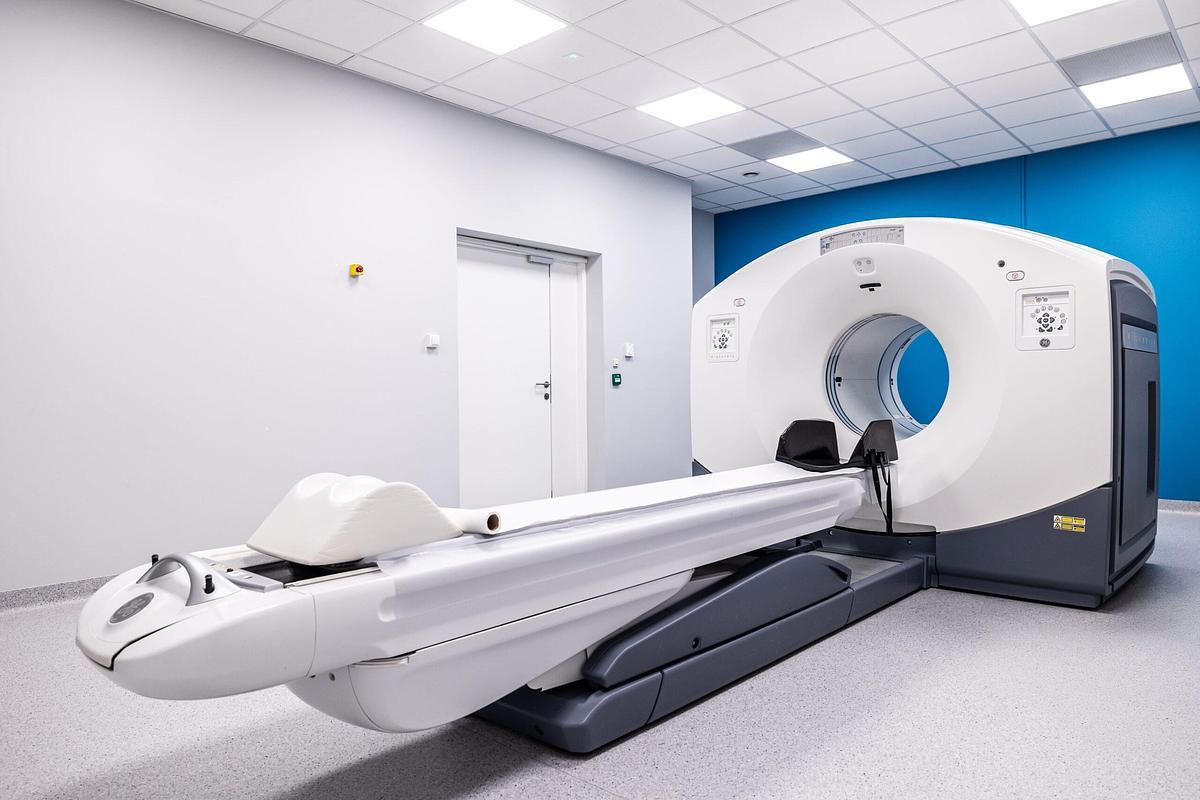
Practical considerations, risk points, and what to ask before you buy, service, move, or maintain imaging equipment.
Before buying a PET/CT scanner, review room layout, structural support, shielding and radiation-safety planning, electrical power, HVAC/cooling, delivery access, control and workstation space, radiotracer workflow where applicable, network/PACS connectivity, service clearance, existing-equipment removal, and local project requirements. MIS should review the scanner model, intended use, room details, photos, access route, timeline, and service expectations before quoting equipment so the buyer does not discover expensive site problems after committing to a system.
The scanner price is only one part of the project. PET/CT is a facility, logistics, IT, and serviceability project at the same time.
Why PET/CT site readiness matters before pricing
A PET/CT quote is not useful if the room cannot support the scanner, the delivery path is blocked, or the facility has not accounted for shielding and workflow. Serious PET/CT planning starts before the purchase order.
The mistake is treating a used or refurbished PET/CT like a standalone asset. It has to fit the room, connect to the facility, support the clinical workflow, and remain serviceable after installation. A system that looks attractive on paper can become a bad buy if the site requires major construction, the floor cannot support the load, or service access is boxed in by casework.
For broader planning context, compare this with MIS guides on CT scanner site preparation and refurbished PET/CT buying. PET/CT borrows from CT planning, but adds radiotracer workflow and radiation-safety considerations.
Room layout, patient flow, and operator workspace
Start with the basic room plan: scanner room, control area, equipment space, patient route, stretcher access, and operator workflow. Confirm room dimensions, ceiling height, door openings, table travel, gantry clearance, control-room visibility, workstation placement, and accessory storage.
PET/CT also raises workflow questions that a plain CT room may not answer. Where will patients wait before the scan? How will injection or uptake workflow be handled if applicable? Can staff move safely between patient areas, scanner, control room, and support spaces?
Do not design around the minimum footprint only. The service team still needs access. Technologists need usable workspace. Patients need a practical route in and out. Useful early inputs include a room sketch, photos from all corners, doorway measurements, ceiling details, utility locations, control-room photos, and prior drawings.
Structural support and delivery access
PET/CT systems are heavy, awkward assets. Before buying, confirm the floor level, slab or structural support, loading dock access, elevator limits, hallway widths, door heights, turns, ramps, and final route into the room. A clean equipment quote does not solve a bad rigging route.
Walk the delivery path before the project is committed. Look for narrow corridors, low ceilings, tight corners, floor transitions, overhead obstructions, glass entries, landscaping, security gates, and areas where a forklift, crane, gantry system, or wall removal may be needed.
Replacement projects need a second pass: how does the old system leave before the new one arrives? Deinstallation, removal, storage, freight, and room construction have to be sequenced. If the facility is selling or trading in existing equipment, review MIS’s guide on deinstalling and selling medical imaging equipment before the downtime window is locked.
Shielding and radiation-safety planning
PET/CT requires qualified radiation-safety and shielding review. The CT side produces X-rays. The PET side involves radiotracer workflow and 511 keV photons. That combination is not something to guess at from a generic checklist.
A qualified medical physicist, radiation-safety officer, architect, engineer, or local project team may need to review room use, occupancy, injection/uptake areas, patient flow, adjacent spaces, walls, floors, ceilings, doors, control barriers, and applicable state or local requirements. Requirements vary by scanner, procedure mix, volume, layout, and jurisdiction.
MIS can help buyers understand the equipment and project scope, but site approval should come from the appropriate qualified professionals. Do not buy a PET/CT first and ask shielding questions later. Also keep PHI out of planning photos and screenshots: remove patient names, dates of birth, accession numbers, and other patient-identifying information before sending files.
Electrical, HVAC, cooling, and environmental factors
PET/CT utilities vary by model and configuration. Before quoting seriously, the project team should review electrical service, grounding, emergency power expectations, heat load, HVAC capacity, cooling requirements, humidity and temperature control, equipment-room needs, and utility routing.
Do not assume an older CT room has enough power or cooling for the PET/CT you want. Do not assume a newer scanner has the same requirements as the unit being removed. PET detector performance, computer systems, CT components, UPS needs, injectors, workstations, and room electronics all add to the planning load.
The right answer is model-specific. Get the scanner make, model, generation, and configuration into the conversation early, then have qualified electrical, mechanical, and facilities professionals confirm what the site can support. Fix HVAC, power quality, or cooling problems before adding a complex imaging system.
Network, PACS/RIS, DICOM, and remote support
PET/CT installation is not complete when the scanner powers on. It has to send images, receive worklists if used, route studies correctly, support technologist workflow, and connect to the reading environment.
At minimum, IT should plan for network drops, IP addressing, AE titles, DICOM destinations, modality worklist, archive routing, viewer access, remote service access, cybersecurity review, and who is authorized to change settings. Do not wait until install week to involve IT. PET/CT studies are large enough that network performance and archive workflow deserve real attention.
If the facility is comparing equipment categories, MIS supports PET/CT systems, CT scanners, and related service planning. The equipment decision and connectivity plan should move together.
Serviceability, parts, and uptime planning
A PET/CT room should be planned for the people who will maintain it. Service clearances, panel access, table access, gantry access, cable routes, equipment cabinets, and safe work areas matter after the ribbon-cutting is over.
Ask these questions before buying:
- Can engineers access the scanner without removing built-ins or blocking patient operations for unnecessary time?
- Are high-risk components supportable for the model under consideration?
- Is there a preventive maintenance plan after installation?
- Are parts, tubes, detector-related components, computers, cables, and accessories realistically supportable?
- Who handles urgent service if the scanner goes down?
A low acquisition price is not a win if the system becomes difficult to maintain. MIS’s advantage is that equipment, medical imaging parts, field service, and project planning are connected under one roof. That is the model buyers should look for in any PET/CT vendor.
What to send MIS before requesting a PET/CT quote
The better the intake, the better the quote. Before asking for PET/CT pricing, send as much of this as you can:
- Desired modality and scanner model, if known.
- Clinical use and expected exam mix.
- Facility location and room address.
- Room dimensions, ceiling height, door sizes, and control-room layout.
- Photos of the room, equipment area, utility locations, and delivery route.
- Existing equipment make, model, serial number, and removal plan if replacing a unit.
- Target installation date and downtime window.
- Budget direction: refurbished, used, leasing, or trade-in.
- Service expectations after installation.
- PACS/RIS/network contacts and known connectivity requirements.
Planning a PET/CT purchase? Start with the PET/CT equipment page, request a scoped equipment quote, or contact MIS through /contact with the scanner, room, route, timeline, and support details before committing to a system.
FAQ
Can a PET/CT scanner go in an existing CT room?
Sometimes, but it depends on the room, scanner model, shielding review, utilities, workflow, and service clearances. An existing CT room is a useful starting point, not an automatic approval.
Does PET/CT require special shielding?
PET/CT requires qualified shielding and radiation-safety review because it combines CT imaging with radiotracer workflow. The final design depends on scanner type, patient volume, room layout, adjacent occupancy, and local requirements.
What utilities does a PET/CT scanner need?
Typical planning includes electrical service, grounding, HVAC, cooling or environmental control, network connectivity, workstation support, and possibly injector or accessory utilities. Requirements are model-specific.
How long does PET/CT installation planning take?
It depends on construction scope, equipment availability, shielding review, permits or local approvals, rigging complexity, IT readiness, and whether an old system must be removed first. Start planning before equipment ships.
What information does MIS need to quote a used or refurbished PET/CT scanner?
MIS needs the intended use, preferred model if known, facility location, room dimensions, site photos, delivery route, existing equipment details, timeline, budget direction, and service/support expectations.
Can MIS help with deinstallation, replacement planning, service, and parts?
Yes. MIS supports equipment sourcing, deinstallation planning, refurbished systems, parts, service, and post-install support. Start with /quote, /services, or /parts depending on the project.
Schema recommendation
Use Article or BlogPosting schema and FAQPage schema for the FAQ section. Use BreadcrumbList where supported. Consider Service schema on true PET/CT installation, deinstallation, service, or quote pages if the page accurately reflects MIS scope. Use Product or ItemList schema only on real PET/CT category or inventory pages with accurate availability data; do not add fake pricing, ratings, or inventory claims.
Need help with this exact problem?
Send the modality, site location, timeline, and any system details. MIS will route the request by intent.
Related resources
Ops Playbook
Emergency CT Scanner Repair: What to Do When It Fails
CT scanner down? Use this emergency repair checklist to document the fault, protect workflow, and route service or parts faster.
Ops Playbook
X-Ray Equipment Lifespan, Maintenance, and Cost Factors
X-ray equipment lifespan depends on tube, detector, generator, software, PM history, parts access, uptime needs, and replacement timing.
Ops Playbook
How to Deinstall and Sell Medical Imaging Equipment Safely
Selling imaging equipment? Gather system details, service history, photos, access constraints, and removal timing before deinstall.