
Ops Playbook
How to Deinstall and Sell Medical Imaging Equipment Safely
May 17, 2026 · 6 min · Medical Imaging Specialists
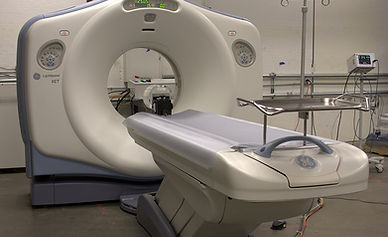
Practical considerations, risk points, and what to ask before you buy, service, move, or maintain imaging equipment.
To deinstall and sell medical imaging equipment, first document the system make, model, serial number, age, software/options, accessories, service history, current condition, non-PHI photos, room location, access path, and target removal date. CT, MRI, PET/CT, X-ray, ultrasound, cath lab, and DEXA systems often need qualified deinstallation, rigging, crating, transport planning, and site coordination. Before removing anything, ask MIS to review the equipment and logistics so the team can advise whether it is a purchase, trade-in, parts, service, or removal opportunity.
The expensive mistake is treating a scanner like ordinary surplus equipment. It is not. Value depends on configuration, completeness, condition, removal risk, and market demand.
Selling imaging equipment is not just listing a machine
A used CT, MRI, PET/CT, or X-ray system has two separate questions: what is the equipment worth, and what will it take to remove it without damaging the system, the room, or the facility schedule?
Those questions are connected. A scanner that is still installed, operating, documented, and complete is usually easier to evaluate than one already disconnected, missing accessories, or sitting in storage. A poor deinstallation can reduce resale value through damaged covers, lost cables, missing workstations, unlabeled components, or incomplete coil and detector sets.
That is why MIS looks at equipment sales, service history, parts, deinstallation, crating, shipping, and replacement planning as one project. If a new system is coming in, start early. Removal date, construction schedule, and replacement plan should line up before the first panel comes off the old system.
For logistics, MIS’s guide to medical imaging equipment deinstallation, shipping, and installation is a useful companion.
Step 1: Gather the equipment identity details
A serious valuation starts with exact system identity. “GE MRI” or “64-slice CT” is not enough. Gather the modality, manufacturer, model, serial number, install year if known, software level, options, and major configuration details.
For MRI, include the magnet model, field strength, coil package, software details if known, workstation, chiller, RF room details, and whether the magnet is ramped, cold, or already decommissioned. Do not attempt magnet work yourself. MRI removal involves real safety hazards and should be handled by qualified professionals.
For CT and PET/CT, include the gantry, table, console, workstations, tube information if available, detector or calibration concerns, injector, UPS, and specialty software. For X-ray, cath lab, C-arm, DEXA, and ultrasound, include generators, detectors, tables, wall stands, monitors, probes, workstations, and accessories. Missing accessories can change value quickly.
If you are still comparing whether to sell, trade, or replace, MIS’s guide on what affects used medical imaging equipment resale value explains the main value drivers.
Step 2: Document condition and service history
Condition matters more than the sales description. Be clear about whether the system is installed and scanning, installed but down, removed from service, in storage, or being sold for parts.
Useful service information includes PM records, known error codes, recent major part replacements, downtime history, image-quality issues, tube changes, detector work, magnet service, chiller repairs, workstation problems, and why the system is being removed. A planned upgrade is a different story than a major failure.
Do not over-polish the condition. Accurate information helps MIS decide the right path: purchase, trade-in, parts recovery, service repair before sale, or coordinated removal. It also avoids wasting time on a quote that changes once the real equipment story comes out.
One practical rule: keep the system powered and intact until it is reviewed if that is safe and operationally possible. A working installed system is easier to demonstrate, photograph, and evaluate than a disconnected system with unlabeled cables and unknown status.
Step 3: Take useful photos without exposing PHI
Good photos speed up review. Take clear images of the full system, nameplates, serial tags, console, workstations, accessories, coils, detectors, cables, cabinets, room layout, doorway path, hallway turns, elevator, loading dock, exterior access, and obstacles that affect rigging.
Before sending photos, check every screen, paper, label, reflection, and background for patient information. Crop or retake the image if anything could expose PHI. For screenshots, remove patient names, accession numbers, dates of birth, study details, and any identifiers. When in doubt, do not send the image until it is cleaned.
Photos should answer two questions: what exactly is being sold, and how difficult will it be to remove? The hallway turn outside the room may matter as much as the gantry photo.
Step 4: Plan deinstallation and rigging before final numbers
Deinstallation is where many used-equipment deals get messy. The quote is not complete until the access path and site constraints are understood.
Review room dimensions, service clearances, ceiling height, doorway width, hallway turns, floor loading, elevator access, dock height, truck access, facility work hours, utilities, power shutdown requirements, cooling connections, shielding considerations, and whether wall, door, or window removal may be required.
MRI adds magnet-safety considerations. CT and PET/CT removals may require coordination around radiation-area policies, heavy gantry movement, cooling, and electrical disconnects. X-ray and cath lab rooms can involve ceiling supports, wall stands, generators, and long cable runs. None of this should be improvised by a general mover.
A qualified plan protects both the facility and the equipment value. It also helps decide whether the best offer is a straight purchase, a trade-in tied to replacement equipment, a parts recovery, or a removal-only project.
What to send MIS for a fast review
To help MIS review quickly, send the modality, manufacturer, model, serial number, install year if known, operating condition, reason for removal, service history, accessories, non-PHI photos, location, access details, desired removal date, and whether you want a purchase, trade-in, replacement quote, parts review, or deinstallation help.
For CT or MRI replacement projects, see MIS’s refurbished CT scanner cost guide and refurbished MRI scanner buying guide so the old asset supports the next purchase instead of becoming a last-minute scramble.
MIS supports used equipment review, refurbishment, parts, field service, and replacement planning through /quote and /contact. For current equipment categories, start with CT equipment, MRI equipment, or X-ray equipment.
Common mistakes when selling imaging equipment
The most common mistake is waiting until the new equipment is already scheduled for delivery. That turns a valuation and removal project into a deadline problem.
Other mistakes include disconnecting the system before review, losing accessories, discarding manuals or workstations, sending photos with patient data visible, assuming original purchase price predicts resale value, ignoring rigging constraints, hiding known faults, or comparing offers with different scopes of work.
A clean sale starts with a clean equipment story. The buyer should understand what the system is, what condition it is in, what is included, where it is located, how it can come out, and when it needs to be gone.
FAQ
Can MIS buy my used MRI, CT, PET/CT, or X-ray system?
MIS reviews used imaging equipment opportunities case by case. Some systems may be purchase candidates, some may work better as trade-ins, some may have parts value, and some may only make sense as a removal or replacement-planning project.
Does the system need to be working to sell it?
Not always, but working status affects value and options. A complete, installed, operational system is easier to evaluate than a disconnected or incomplete system. Non-working systems may still have parts or refurbishment value depending on model, condition, and demand.
How long does medical imaging equipment deinstallation take?
It depends on modality, site access, facility rules, rigging needs, utilities, and whether construction changes are required. A simple removal and a complex MRI or cath lab deinstallation are not the same project. Review the site before assuming a timeline.
Who handles rigging and transport for CT or MRI removal?
Qualified imaging deinstallation and rigging teams should handle heavy medical imaging removals. The plan may involve service engineers, riggers, freight coordination, crating, facility management, and safety personnel depending on the system and site.
Can I sell individual parts instead of the whole system?
Sometimes. Parts recovery may make sense when a complete system is not marketable, is missing critical components, or has a major failure. MIS can review whether whole-system sale, trade-in, parts recovery, or removal support is the better path.
What information should I remove from photos before sending them?
Remove patient names, dates of birth, accession numbers, exam details, study lists, labels, paperwork, and anything else that could identify a patient. If a monitor or console screen is visible, crop or retake the photo.
Schema recommendation
Use Article or BlogPosting schema for the post and FAQPage schema for the FAQ section. Add BreadcrumbList sitewide if supported. Use Service schema only on a dedicated deinstallation, removal, or equipment-sale service page that accurately describes the service being offered.
Selling or removing CT, MRI, PET/CT, X-ray, cath lab, ultrasound, or DEXA equipment? Send MIS the system details, service history, photos, access constraints, location, and target removal date through /contact or request a replacement/equipment review through /quote.
Need help with this exact problem?
Send the modality, site location, timeline, and any system details. MIS will route the request by intent.
Related resources
Ops Playbook
Emergency CT Scanner Repair: What to Do When It Fails
CT scanner down? Use this emergency repair checklist to document the fault, protect workflow, and route service or parts faster.
Ops Playbook
PET/CT Scanner Site Requirements Before You Buy
Before buying a PET/CT scanner, review room layout, shielding, power, HVAC, rigging, workflow, connectivity, service access, and replacement timing.
Ops Playbook
X-Ray Equipment Lifespan, Maintenance, and Cost Factors
X-ray equipment lifespan depends on tube, detector, generator, software, PM history, parts access, uptime needs, and replacement timing.